

YouTube is adding more AI capability to its Create app, while it’s also giving channel managers more insight into shopping performance data, for those looking to sell items in the app.
First off, YouTube has confirmed that it’s now added Google’s latest Veo 3 Fast model to YouTube Create, its separate video editing app, designed specifically for Shorts creation.
Well, to the Android version that is.
YouTube’s Create app, which it launched last year in selected markets, is a free video editing tool, which provides access to a range of functions that make it easier to formulate more complex video clips.
And now, Android users of Create will be able to access Google’s most advanced AI video creation tools in stream, which YouTube says could be especially helpful for generating shots that you didn’t get.
“With the Veo 3 Fast model in YouTube Create, you can generate vertical video clips while controlling the lighting and style to simply get the shot you need.”
YouTube Create also has an “Edit with AI” feature, which can create videos from your raw footage, including music and effects.
These are helpful additions, though YouTube Create is still only available on selected devices, in selected regions (more info here).
YouTube’s also providing channel managers with more shopping insights, with seller-level breakdowns of shopping performance data.
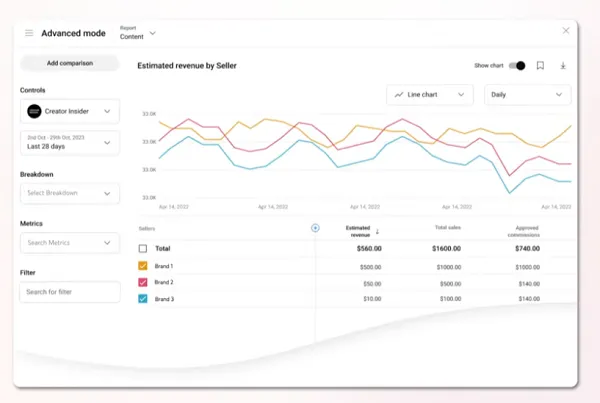
That will provide more insight into shopping performance on YouTube, which could help in guiding content and partnership decisions.
“Creators can find this info by going to YouTube Studio Analytics, then ‘Advanced Mode,’ then selecting ‘Seller’ under breakdown. Creators will be able to see things like total sales, orders, returned products, and more.”
Finally, YouTube’s also provided some notes on its latest additions to the Inspiration tab, which now provides more prompts for your content.
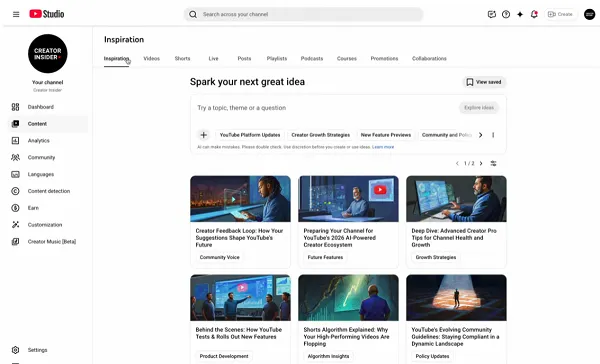
As you can see in this example, now, when you tap on the Inspiration tab in YouTube Studio, you’ll immediately see a range of content ideas, customized for your channel, based on your past content, trends, etc.
And YouTube’s added more customization options for this display:
“We’ve added more control to the visual experience here. By clicking on the ‘Settings’ icon, you can now set your image preferences to view ideas in digital painting or sketch style, or disable images entirely if you prefer to leave it to your imagination. And don’t worry about losing your train of thought. You can now use the back and forward arrows on the feed to navigate between your iterations.”
And once you find an interesting idea, you can tap/click through to see more details.
“Here you can see the ‘why’ behind the suggestion. We provide data-driven insights, including audience interest indicators, view prediction signals, and how the specific idea connects to your previous videos.”
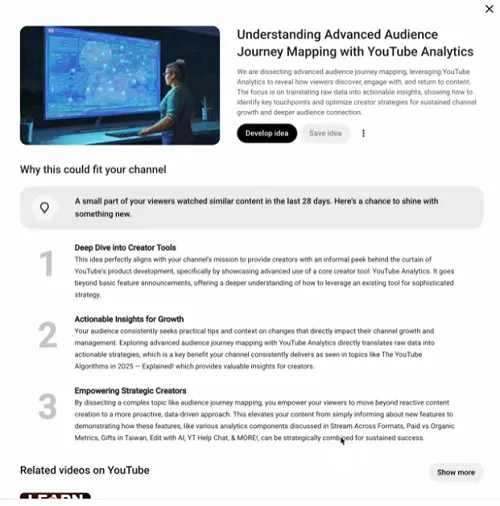
So, more info to go on to inspire your YouTube content, based on trending videos related to your content niche.
It could be a valuable accompaniment to your process, providing another means to keep your YouTube channel content flowing, ensuring you don’t run out of ideas.
Which is a constant problem for creators, and why being a creator often proves too much for many aspiring influencers. Because it requires constant posting, regular engagement, it’s a lot of work to build a YouTube presence to a monetizable level.
Maybe the inspiration tab will provide to be a valuable tool in this respect, and help more creators make more money from the app.
YouTube says that the Inspiration tab is now available on the web version of YouTube Studio in all regions.

